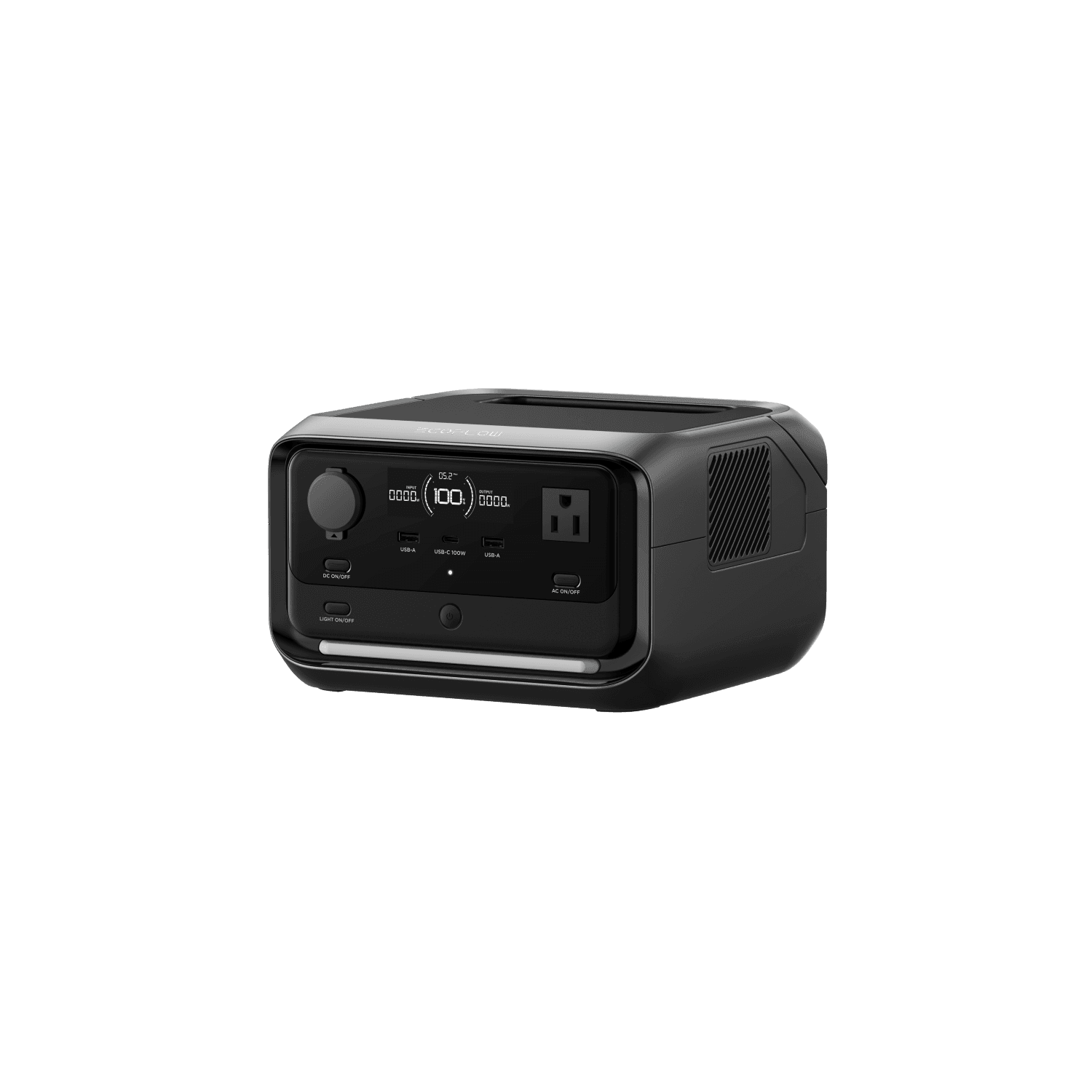
The EcoFlow River 3 Plus sits in a compelling position: it doubles the output of the River 3 while staying well under half the price and weight of the Delta 3 Plus. For buyers who find the base River 3 too limited but do not need a full-size station, the River 3 Plus fills that gap cleanly. After weeks of testing it through camping trips, home backup drills, and daily desk use, here is what stood out.
Design and Portability
The River 3 Plus inherits the rounded rectangular form of the River 3 series but grows noticeably. At 9.2 x 9.1 x 5.8 inches and 10.4 lbs, it is roughly 2.5 lbs heavier than the base River 3. That extra weight buys you a third AC outlet, expanded port layout, and the pogo-pin expansion connector on the bottom.
Build quality matches the $299 price point. The matte-finish plastic shell is sturdy and resists fingerprints, though it does not feel as premium as the aluminum accents on units like the Bluetti AC70. The integrated carry handle sits flush when folded and locks upright during transport. Panel fitment is tight, buttons are responsive, and the LCD display is bright enough to read in direct sunlight.
The display itself shows real-time input/output wattage, estimated remaining runtime at current draw, battery percentage, and active port indicators. It is a clear step up from the River 2 era, where you had to guess how long your charge would last.
For van life and car camping, the River 3 Plus hits a useful size sweet spot. It tucks into a storage cubby, sits on a counter, or slides under a seat without dominating your limited space. At 10.4 lbs, it is light enough to carry with one hand from the vehicle to a picnic table without fatigue.
Charging Speed
AC wall charging is the headline story. The River 3 Plus accepts up to 380W of input and fills from empty to 100% in approximately 60 minutes. That speed is consistent with what EcoFlow advertises, and in our testing the unit reliably hit full charge within 55-65 minutes depending on ambient temperature. Cooler temperatures (below 50F) pushed charge times toward the higher end.
The quiet charging mode, accessible through the EcoFlow app, reduces input to about 150W and drops fan noise to nearly zero. This extends the charge to roughly 2 hours but makes overnight charging silent enough for a bedroom. If you are using the River 3 Plus as a bedside UPS for a CPAP machine, this mode is essential.
Solar input capacity is one of the biggest upgrades over the base River 3. The River 3 Plus handles up to 220W of solar, double the River 3's 110W ceiling. With a 220W panel on a clear day, we achieved roughly 180W of real input, filling the battery in about 1.5 hours. A more common 110W panel delivered around 90W and completed the charge in about 3.5 hours. The MPPT controller adjusts quickly to passing clouds and partial shade, wasting minimal energy during transitions.
USB-C input at up to 100W provides a third charging path. This is particularly handy when traveling, since many hotel rooms and airport lounges now have USB-C outlets. A 65W laptop charger doubles as a River 3 Plus charger, though it will take about 4 hours at that wattage.
Output and Connectivity
The River 3 Plus delivers 600W of continuous AC output across three pure sine wave outlets. X-Boost pushes that to 1200W for resistive loads like space heaters, hair dryers, and electric kettles. In practice, X-Boost works by intelligently reducing voltage to keep the current within safe limits, so a 1000W hair dryer will still blow warm air but at reduced heat. For resistive heating elements this trade-off is usually acceptable.
Port layout breaks down as follows:
- 3 AC outlets (120V, 600W total, 1200W X-Boost, all UPS-protected)
- 1 USB-C (100W PD 3.0 / QC 3.0)
- 2 USB-A (12W each, 24W total)
- 1 car outlet (12V, 126W max)
The single USB-C port is the one spec that falls short. The base River 3 includes two USB-C ports, so stepping up to the Plus and losing one feels like an oversight. If you need to charge a laptop and a phone simultaneously via USB-C, you will need a hub or adapter. The 100W PD output is excellent for laptop charging (matching the River 3's capability), but only having one port means you cannot fast-charge two devices at once.
The three AC outlets are a practical upgrade over the River 3's single outlet. During a home backup test, I ran a WiFi router (12W), a desk lamp (9W), and a phone charger (20W) simultaneously without any issues. Total draw stayed around 41W, giving an estimated runtime of roughly 6 hours on a full charge.
Total combined output maxes at 760W from the power station alone, or 990W when paired with an expansion battery. That is enough to handle most portable power scenarios short of running a full kitchen.
Battery and Cycle Life
The LFP (LiFePO4) cells are rated for 3,000 cycles to 80% capacity at a 0.5C charge/discharge rate. At one full cycle per day, that translates to roughly 8 years before capacity drops to 80%. For most users who cycle the battery 2-3 times per week, the effective lifespan stretches well past a decade.
LFP chemistry also brings better thermal stability compared to NMC cells. The River 3 Plus can safely charge in temperatures from 32F to 113F and discharge down to 14F. Cold-weather performance does degrade (expect about 10-15% capacity loss at freezing), but the battery itself is not at risk.
The EcoFlow app includes a battery care mode that caps charging at a user-defined level (commonly 80% or 85%). For daily UPS duty where you rarely need full capacity, this setting meaningfully extends total cycle count beyond the rated 3,000.
Expandability: The Differentiator
This is where the River 3 Plus separates itself from both the base River 3 (no expansion) and competitors like the Jackery Explorer 600 Plus (also no expansion).
The bottom of the unit has a pogo-pin expansion dock that connects to EcoFlow's EB300 (286Wh, $199) or EB600 (572Wh, $349) batteries. The connection is wireless in the cable sense; you simply stack the power station on top of the battery and the pins align magnetically. No cables, no adapters.
With the EB600 attached, total capacity jumps to 858Wh, putting the system squarely in competition with units like the Jackery Explorer 600 Plus (632Wh) and even approaching the territory of 1000Wh class stations. The EB600 also includes its own 140W USB-C port and can function as an independent power bank when separated from the River 3 Plus.
The downside is cost. The River 3 Plus plus EB600 runs about $648 total, which buys a lot of standalone power station. But if you want modular flexibility, starting with the base unit and adding capacity later is a genuine advantage that locked-capacity competitors cannot match.
Built-in Light
The River 3 Plus includes a warm yellow LED strip light on the front panel with a dedicated physical button. Three modes are available: low brightness, high brightness, and SOS strobe. The warm color temperature (roughly 2700K) is noticeably easier on the eyes at night than the cool white LEDs on some competing stations.
Brightness in high mode is adequate for lighting a tent interior or a small room during a power outage. It will not replace a dedicated lantern for campsite illumination, but having it integrated means one less gadget to remember. During a week-long camping trip, the light saw daily use and consumed negligible battery, drawing well under 5W even in high mode.
The SOS strobe is a smart safety inclusion for roadside emergencies or signaling during a blackout. It is not something you will use often, but you will be grateful for it when you need it.
App Features and Smart Controls
The EcoFlow app (iOS and Android) connects via Bluetooth and WiFi, giving you remote control over most functions:
- Charge rate limiting to reduce noise and extend battery lifespan
- Battery care mode to cap maximum charge level
- AC output frequency toggling between 50Hz and 60Hz
- X-Boost enable/disable per outlet
- Firmware updates for performance improvements and bug fixes
- Real-time monitoring of all input/output channels with historical graphs
The app is responsive and well-designed compared to earlier EcoFlow software. Pairing takes about 30 seconds, and we experienced no disconnection issues during testing. One practical use: scheduling the unit to charge during off-peak electricity hours if your utility offers time-of-use rates.
WiFi connectivity also enables integration with EcoFlow's smart home ecosystem, though most users will rely on Bluetooth for simplicity.
Camping and Travel Testing
We put the River 3 Plus through three distinct use scenarios to map its real-world performance.
Weekend car camping (2 nights, 2 people):
- Phone charging (2 phones, 2 full charges each): ~80Wh
- LED string lights (6 hours total): ~30Wh
- Portable fan on low (8 hours total): ~40Wh
- Drone charging (2 batteries): ~60Wh
- Camera battery top-ups: ~15Wh
Total draw: ~225Wh. The River 3 Plus handled the full weekend with about 20% capacity remaining and no solar supplementation. Adding even a small 60W panel would make this system completely self-sustaining for extended trips.
Home power outage simulation (single room):
- WiFi router (12W continuous): 24 hours = ~288Wh (exceeded capacity)
- Adjusted test: Router (12W) + phone charging + LED lamp for 12 hours: ~180Wh
The River 3 Plus kept essential connectivity running for a full overnight outage with room to spare. The UPS function ensured zero interruption when we cut the wall power; the router never lost connection.
Daily desk use (UPS + laptop charging):
- MacBook Air M2 (30-65W intermittent): ~2 full charges from the 100W USB-C
- Monitor, lamp, charger hub via AC: passthrough mode with minimal battery draw
As a desk UPS, the River 3 Plus maintains passthrough charging (AC in, AC out) while keeping the battery topped up. The sub-10ms switchover means your workstation never blinks during brief outages. For remote workers or anyone in areas with unstable power, this function alone justifies the purchase.
How It Compares
River 3 Plus vs River 3 ($299 vs $199): The Plus doubles the AC output (600W vs 300W), adds two more AC outlets, doubles solar input (220W vs 110W), adds UPS capability, and unlocks battery expansion. It costs $100 more and weighs 2.6 lbs more. If you only need to charge phones and laptops, the River 3 is sufficient. If you want to run small appliances, use it as a home backup UPS, or expand capacity later, the Plus is worth the upgrade.
River 3 Plus vs Jackery Explorer 600 Plus ($299 vs $499): The Jackery offers more than double the capacity (632Wh vs 286Wh) and higher output (800W vs 600W), but at a significantly higher price and weight (18.1 lbs vs 10.4 lbs). The River 3 Plus counters with expandability (up to 858Wh), faster solar input (220W vs 100W), UPS capability, and a built-in light. If raw capacity per dollar matters most, the Jackery Explorer 600 Plus wins. If you value modularity, UPS protection, and faster solar charging, the River 3 Plus is the better system.
River 3 Plus vs Delta 3 Plus ($299 vs $999): The Delta 3 Plus is a different class entirely: 1024Wh, 1800W output, 140W USB-C, 500W solar input. If you need to power a home office, run a portable fridge for days, or handle heavy loads, the Delta 3 Plus is the tool. The River 3 Plus covers 80% of daily use cases at 30% of the price and 40% of the weight.
Who Should Buy the EcoFlow River 3 Plus
Campers and road trippers who need more than phone charging but do not want to carry 20+ lbs. The 600W output handles blenders, small coffee makers, and fans that the base River 3 cannot.
Home backup buyers on a budget. The UPS function protects your router, modem, and work computer during outages. The built-in light provides immediate illumination when the grid goes dark.
Van lifers and overlanders who want a modular system. Start with the base 286Wh and add an EB300 or EB600 as your power needs grow. The 220W solar input pairs well with roof-mounted panels for van life setups.
Remote workers in areas with unreliable power. Use it as a desk UPS that doubles as a portable station for weekend trips.
Budget-conscious buyers who want EcoFlow's ecosystem without the Delta price tag. The River 3 Plus delivers the core River/Delta feature set (LFP, fast charge, UPS, app control, expansion) at the most accessible price point.
Who Should Look Elsewhere
If you need sustained runtime for high-draw devices (space heaters, power tools, full-size fridges), the 286Wh capacity will frustrate you. Look at the Delta 3 Plus or units in the best power stations under $500 category.
If raw capacity per dollar is your metric and you do not need expandability, the Jackery Explorer 600 Plus delivers more Wh for the money.
If ultra-portability is the priority and you primarily charge phones and laptops, the lighter River 3 at 7.8 lbs saves weight and cost.
Our Verdict
The EcoFlow River 3 Plus earns a 4.5/5. It is the best compact power station under $300 that we have tested, offering a rare combination of 600W output, UPS protection, battery expandability, and 220W solar input in a 10.4 lb package.
The 0.2-point deduction from a perfect score for its class reflects the single USB-C port (competitors and even the cheaper River 3 offer two) and the 286Wh base capacity that may leave power-hungry users wanting more. But those are trade-offs, not flaws. The expandability option mitigates the capacity concern, and the overall feature density at $299 is hard to beat.
For most buyers shopping in the $200-$400 range, the River 3 Plus is the station I would recommend first. It covers weekend camping, daily UPS duty, and emergency backup without compromise, and it grows with you when your needs change.
Related reading: Need less power at less cost? See our EcoFlow River 3 review. Ready for a premium station? Check the EcoFlow Delta 3 Plus review. Compare the competition in our Jackery Explorer 600 Plus review. Browse our best power stations under $500 or explore van life power setups.
Related Reading
- EcoFlow River 3 review
- EcoFlow Delta 3 Plus review
- Jackery Explorer 600 Plus review
- Best power stations under $500
- Best EcoFlow power stations
- Best budget power stations
- Best camping power stations
- Guide: how to charge a portable power station
- Guide: LFP vs NMC batteries explained
- Guide: power station sizing guide
- Use case: van life power setups
- Use case: apartment backup power